




Diseñe la solución de vending perfecta para su ubicación y clientes.

Únete al boletín de VMFS y forma parte de una red próspera dedicada al éxito colectivo.
Un registro. Posibilidades infinitas.
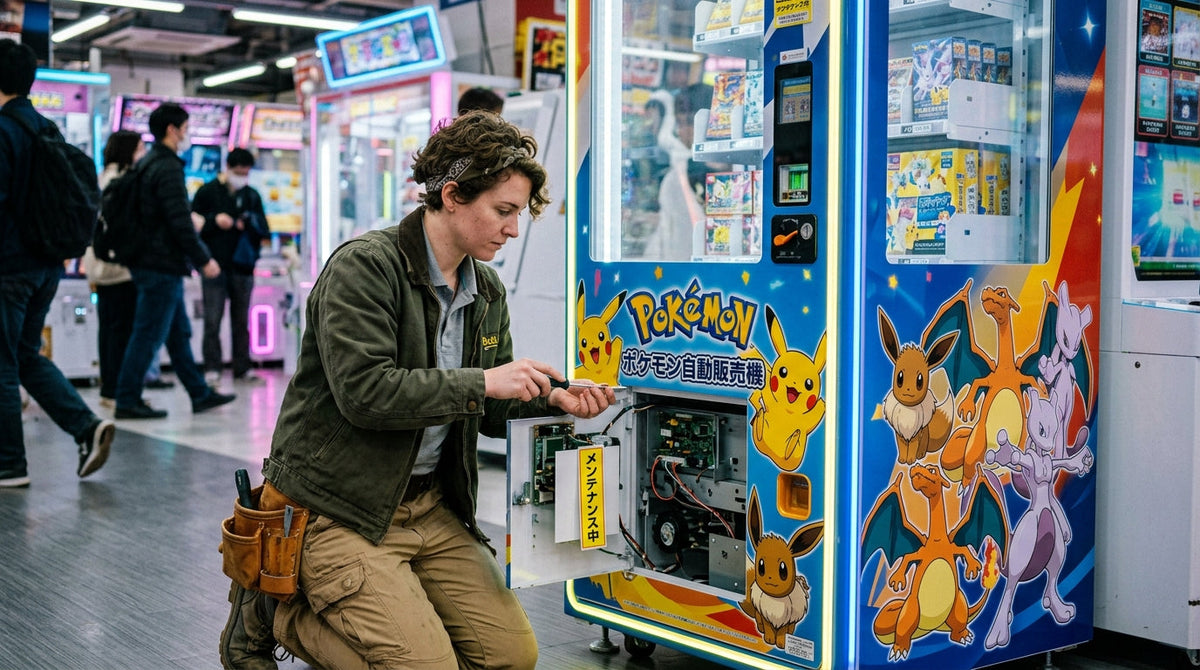
Cuando una máquina expendedora de Pokémon indica que se está realizando un mantenimiento, se ha sacado de servicio a propósito, generalmente mientras se repone el stock, se le da mantenimiento o se actualiza, y vuelve a vender una vez que ese trabajo ha terminado. Para los operadores, el mantenimiento de una máquina expendedora de Pokémon significa realizar comprobaciones rápidas en cada visita, además de un mantenimiento más profundo semanal, mensual, trimestral y anual.
Esta guía responde primero a las preguntas de los coleccionistas (qué significa la pantalla, cuánto tiempo dura y a quién contactar), y luego detalla el calendario completo para operadores, los tiempos de visita, los componentes que hay que inspeccionar y cuándo restablecer, reparar o llamar a un técnico.
Una máquina expendedora de Pokémon que muestra el mensaje «Esta máquina se encuentra actualmente realizando un mantenimiento» se ha desactivado intencionadamente para dejar de vender, por lo que no aceptará pagos ni dispensará productos hasta que el trabajo haya terminado y se vuelva a poner en servicio. El mensaje es una pantalla de estado, no un error que se pueda eliminar desde la parte delantera de la máquina, y evita que pague por un producto que la máquina no pueda entregar de forma fiable.
Las máquinas oficiales del Juego de Cartas Coleccionables Pokémon que se encuentran en supermercados y centros comerciales son propiedad y están gestionadas por The Pokémon Company International (TPCi), según las Preguntas frecuentes sobre las máquinas expendedoras automáticas de Pokémon. Esto es importante para los coleccionistas porque el establecimiento que alberga la máquina no la controla. Las mismas preguntas frecuentes indican que los empleados y personal de reposición de la tienda no pueden ayudar con los problemas de la máquina ni responder preguntas sobre la reposición de stock, y que TPCi no publica un calendario de reposición ni avisa a los clientes antes de que se produzca.

TPCi no publica ninguna definición de la pantalla de mantenimiento, por lo que la respuesta más sincera es que abarca cualquier período de inactividad planificado o imprevisto. Cuatro causas explican casi todos los casos en un quiosco de cartas conectado a la red. La primera es una reposición de stock o una visita de mantenimiento: el personal de reposición abre el armario, carga las bandejas y actualiza el recuento de inventario, y la máquina permanece bloqueada para las ventas mientras la puerta está abierta. La segunda es una actualización de software o de configuración; cuando se desconectaron las máquinas oficiales en 2025 para instalar un software que limitaba el número de artículos que un comprador podía adquirir, una máquina de un supermercado Safeway de Los Altos se quedó en «Realizando mantenimiento» durante el cierre, según informó el Los Altos Town Crier. La tercera es un fallo, como un atasco en la trayectoria de entrega o un lector de pagos que ha perdido la conexión, que la máquina detecta y que requiere la intervención de un técnico. La cuarta es el traslado o la retirada de la máquina.
Reposición de stock o visita de mantenimiento
El armario está abierto y se están cargando o limpiando las bandejas. Por lo general, se soluciona el mismo día.
Actualización de software o de política
Implementada por el operador, como nuevas limitaciones de compra. Puede durar hasta que se instale la actualización.
Fallo detectado
Atasco, lector sin conexión o error de hardware a la espera de un técnico. Infórmelo si se le ha cobrado.
Traslado o retirada
Se está retirando la máquina del lugar. Compruebe si sigue apareciendo en el localizador oficial.
La última causa es más común de lo que la mayoría de los coleccionistas esperan. Wargamer informó en mayo de 2026, citando datos de seguimiento de PokéBeach, que había 1.871 máquinas oficiales en 28 estados, de las cuales 207 fueron retiradas y 562 añadidas desde mayo de 2025. Una máquina que lleve semanas mostrando la pantalla de mantenimiento podría ser una de las unidades que se están retirando, por lo que comprobar el localizador oficial es un mejor siguiente paso que realizar visitas repetidas.
Vuelva más tarde el mismo día, porque una reposición de stock o una visita de mantenimiento son breves. Si la pantalla sigue activa en una segunda visita, consulte el localizador oficial para comprobar si la máquina sigue apareciendo en la lista y lea nuestra guía sobre cómo encontrar máquinas expendedoras de Pokémon cerca de usted para buscar alternativas. Si se le ha cobrado sin recibir ningún producto o si la máquina está dañada, las preguntas frecuentes de TPCi indican a los clientes que contacten con el equipo de asistencia de máquinas expendedoras automáticas de Pokémon en el 866-872-4790 o que envíen una solicitud de asistencia a Pokémon Center. TPCi no acepta devoluciones de compras realizadas en máquinas expendedoras, por lo que informe de una dispensación fallida en lugar de pedir un reembolso en la tienda. Si es nuevo en los quioscos, nuestro tutorial sobre cómo usar una máquina expendedora de Pokémon explica cómo realizar pagos y recoger el producto.
Atajo para coleccionistas: ¿La pantalla de mantenimiento aparece una vez? Vuelva más tarde. ¿La pantalla de mantenimiento lleva días? Consulte el localizador y luego llame a la línea de asistencia de TPCi. El personal de la tienda no puede desbloquear, reponer ni reembolsar la máquina.
Una reposición de stock o una parada de mantenimiento rutinario suele durar minutos en lugar de horas, mientras que un cierre general de software o de política puede mantener una máquina en la pantalla de mantenimiento sin anunciar ninguna fecha de finalización. No existe una duración oficial: las preguntas frecuentes de TPCi indican que no hay un calendario de reposición fijo y que el momento de la reposición se decide caso por caso en función del stock de productos y de las necesidades de inventario de la máquina.
Para hacerse una idea de lo que implica una visita presencial, los datos de ruta de los operadores de máquinas expendedoras son la mejor guía. En un caso de estudio de Vendmax Services publicado por Upper, una reposición básica tardó unos 15 minutos, una reposición con limpieza unos 25 minutos y una máquina que necesitaba reparación 45 minutos o más. Los quioscos de cartas siguen el mismo patrón, por lo que un comprador que llega a mitad de visita suele enfrentarse a una espera breve, no a una máquina cerrada. El cierre de 2025 descrito anteriormente es el caso contrario: unas 400 máquinas de todo el país se desactivaron hasta que se instaló un nuevo software de limitaciones de compra, y la empresa no pudo decir cuándo volverían a funcionar.
| Por qué la máquina está en mantenimiento | Qué está ocurriendo | Duración habitual |
|---|---|---|
| Visita de reposición | Armario abierto, bandejas cargadas, recuento de inventario actualizado | Unos 15 minutos para una reposición básica (caso de estudio de Upper) |
| Reposición y limpieza | El cristal, la pantalla táctil y el depósito de entrega se limpian durante la visita | Unos 25 minutos (caso de estudio de Upper) |
| Visita de reparación | Se diagnostica atasco, fallo del lector o del hardware en el lugar | 45 minutos o más (caso de estudio de Upper) |
| Actualización de software o de política | Actualización remota, como nuevas limitaciones de compra | Sin fecha de finalización; el cierre de unas 400 máquinas en 2025 no tenía fecha de reinicio anunciada (Los Altos Town Crier) |
| Traslado o retirada | Se está retirando la máquina del lugar | Permanente en ese lugar (compruebe el localizador) |
El tiempo de inactividad nocturna es una pregunta relacionada, ya que algunas tiendas que la albergan cierran durante la noche; lo tratamos en detalle en si las máquinas expendedoras de Pokémon dejan de vender por la noche. El momento de la reposición es de nuevo un tema aparte, tratado en nuestra guía sobre los horarios de reposición de las máquinas expendedoras de Pokémon.
Para los operadores que gestionan sus propias máquinas de cartas, un calendario de mantenimiento por escrito convierte la pantalla de mantenimiento en un evento breve y planificado en lugar de una interrupción inesperada que supone la pérdida de ventas y de confianza. Un calendario estructurado detecta el desgaste cuando aún es leve y barato de reparar, en lugar de permitir que se acumule hasta provocar una avería que deje la máquina completamente fuera de servicio.
Las máquinas de cartas suelen tener más valor por ranura que una máquina de aperitivos, ya que las ranuras pueden contener cajas de sobres y Cajas de Entrenador Élite, por lo que cada hora de inactividad cuesta más, y los coleccionistas que encuentran repetidamente una pantalla inactiva tienen todos los motivos para comprar en otro sitio. Los principios que se presentan a continuación se aplican a cualquier máquina expendedora de propiedad independiente que venda cartas coleccionables, y se basan en nuestra guía general de mantenimiento de máquinas expendedoras, que trata la refrigeración, la limpieza de resistencias y los costes de reparación que las máquinas de cartas no necesitan en su mayoría. Las máquinas de cartas funcionan a temperatura ambiente, por lo que el trabajo se centra en cuatro sistemas: entrega de productos, pagos, seguridad y pantalla táctil.
Un calendario para operadores de una máquina de cartas Pokémon consta de cuatro niveles: comprobaciones rápidas en cada visita, tareas semanales ligeramente más profundas, un mantenimiento mensual dentro del armario y trabajos trimestrales y anuales que pueden requerir la intervención de un técnico. Cada nivel abarca componentes que se desgastan o se desajustan a diferentes velocidades, por lo que los niveles más profundos se realizan con menos frecuencia.
| Intervalo | Tareas principales | Quién lo realiza |
|---|---|---|
| Cada visita | Comprobación visual de daños, prueba de pago, dispensación de prueba, comprobación de cerraduras y caja de efectivo | Operador o conductor de ruta |
| Semanalmente | Comprobación de dispensación ranura por ranura, respuesta de la pantalla, limpieza del exterior y de la pantalla táctil | Operador |
| Mensualmente | Inspección con el armario abierto del mecanismo de entrega, comprobación del firmware, prueba de cerraduras, bisagras y sensores | Operador |
| Trimestralmente | Limpieza profunda interna, inspección del cableado y los conectores, inspección del hardware del lector | Operador o técnico |
| Anualmente | Inspección completa de la placa de control, el hardware de pago y la estructura del armario; sustitución de las piezas señaladas | Se recomienda un técnico |
Las comprobaciones por visita son tareas rápidas que se realizan cuando ya se está en el lugar, generalmente durante una reposición de stock, por lo que nunca necesitan un viaje específico. Observe el cristal y el armario en busca de grietas, marcas de palanca o manipulaciones, pase una carta real o realice un pago con el móvil para confirmar que el lector autoriza, realice una dispensación de prueba para confirmar que funciona correctamente y compruebe que las cerraduras y cualquier caja de efectivo están seguras y sin daños. Una comprobación visual del lector no es suficiente, porque un lector puede encenderse normalmente y aun así no autorizar; solo una transacción completada demuestra que la vía de pago funciona.
Las tareas semanales van un nivel más allá y se centran en los patrones de desgaste que aparecen antes de que un cliente los note. Rote la dispensación de prueba a través de diferentes ranuras para que cada una dispense sin vacilación a lo largo del mes, confirme que la pantalla táctil responde con precisión en todo el panel y limpie el cristal, los botones y la superficie de pago. Las pautas de limpieza de los CDC indican que las superficies de contacto frecuente merecen la mayor atención y que las superficies deben limpiarse antes de desinfectarse; en una pantalla táctil, aplique el producto en un paño en lugar de rociarlo en el marco o el lector.

Las tareas mensuales abordan componentes que se desgastan gradualmente y que nunca deberían pasar más de unas cuatro semanas sin comprobar. Abra el armario e inspeccione el mecanismo de entrega, las bandejas y las guías, confirme que la máquina y el dispositivo de pago ejecutan el software más reciente, y pruebe las cerraduras, bisagras y cualquier sensor de manipulación. Esta también es la visita para eliminar el polvo de los ventiladores y placas internos y comprobar que ningún conector de alimentación o datos esté deshilachado o flojo, porque los cables sueltos y el flujo de aire bloqueado están detrás de muchos de los fallos de pantalla tratados en nuestra solución para la pantalla negra de las máquinas expendedoras de Pokémon.
Desconecte la máquina antes de meter la mano. La norma de bloqueo y etiquetado de OSHA, 29 CFR 1910.147, exime a los equipos con cable y enchufe del bloqueo completo solo cuando el enchufe se retira y se mantiene bajo el control exclusivo de la persona que realiza el trabajo, lo cual es un hábito sencillo que vale la pena incorporar a cada visita con el armario abierto.
Las tareas trimestrales y anuales son el mantenimiento más profundo que se beneficia de un técnico o lo requiere. Cada trimestre, realice una limpieza profunda del mecanismo interno e inspeccione el mazo de cables, los conectores y el montaje del lector en busca de desgaste. Una vez al año, haga que se inspeccione en su conjunto la placa de control, el hardware de pago y la estructura del armario, y sustituya cualquier pieza que las comprobaciones trimestrales hayan señalado como cercana al final de su vida útil. Los operadores que ya gestionan una ruta más amplia pueden integrar estas visitas en la lista de comprobación operativa que utilizan para otros equipos.
Detecte los fallos antes que los coleccionistas
VMFS Cloud envía alertas de atasco, falta de conexión, puerta abierta y lector de pago a su teléfono para que pueda solucionar los problemas antes de que la pantalla de mantenimiento le cueste ventas.
Explorar VMFS CloudEl tiempo de mantenimiento depende principalmente de lo que se comprueba en una visita, y luego del tráfico del lugar, la antigüedad de la máquina y su capacidad. La lista de tareas establece la base, por lo que una parada solo para reponer stock es breve y un mantenimiento trimestral con desmontaje parcial es largo; los factores siguientes alargan o acortan esa base.
Un lugar concurrido agota el stock más rápido, por lo que la máquina necesita visitas más frecuentes, pero cada visita mantiene aproximadamente la misma duración porque las tareas no cambian con el volumen. Lo que cambia es con qué frecuencia se reinicia el reloj. Los lugares de mucho tráfico también desgastan más rápido las piezas de entrega y las superficies táctiles, por lo que conviene establecer una cadencia realista antes de la instalación. Nuestro servicio de emparejamiento de ubicaciones y la guía de VPlaced sobre los mejores lugares para instalar máquinas expendedoras de Pokémon ayudan a ajustar el tráfico al tiempo de servicio que realmente puede dedicar a un lugar.

Las máquinas más antiguas tardan más en recibir mantenimiento porque el desgaste se acumula. Un mecanismo de entrega ligeramente desajustado tarda más en diagnosticarse y corregirse que uno que se comprobó según el calendario el trimestre anterior, por lo que un mantenimiento constante mantiene cada visita breve y el mantenimiento aplazado hace que cada visita dure más. Una instalación completamente nueva es la excepción que funciona al revés, lo cual se trata en la sección de nuevas vs. usadas a continuación.
Una unidad de gran capacidad tarda más en reponerse, pero la parte de inspección de la visita se mantiene aproximadamente igual, porque comprueba los sistemas en lugar de las ranuras individuales. La máquina expendedora de cartas coleccionables PRO XL, por ejemplo, alberga hasta 800 sobres en 8 bandejas configurables, por lo que el tiempo de carga escala con el número de bandejas que recarga, mientras que las comprobaciones del lector, la cerradura y la pantalla no. Nuestro desglose de los componentes de las máquinas expendedoras de Pokémon muestra qué piezas escalan con la capacidad y cuáles no.
Reponer stock significa rellenar el inventario vendido, mientras que el mantenimiento significa dar servicio al mecanismo de entrega, el sistema de pago, el hardware de seguridad y el software. Tratar ambos como el mismo trabajo es un error común de los operadores que deja sin detectar importantes carencias de mantenimiento, porque una máquina puede estar completamente abastecida y aun así tener un lector defectuoso o una cerradura atascada.
Los dos calendarios coinciden en el tiempo, pero no en el contenido. La frecuencia de reposición depende del tráfico y de la variedad de productos, aspectos que cubre nuestra guía de reposición de máquinas expendedoras de Pokémon, mientras que la frecuencia de mantenimiento sigue los intervalos indicados anteriormente. La solución práctica es vincular las comprobaciones de cada visita y las semanales a las visitas de reposición, y planificar el trabajo mensual y trimestral como una línea independiente en la hoja de ruta. Así, las reposiciones son rápidas y, aun así, se garantiza que se realicen las comprobaciones más exhaustivas.
Cuatro sistemas concentran la mayor parte del mantenimiento que necesita una máquina expendedora de cartas Pokémon a lo largo de su vida útil: el mecanismo de entrega de productos, el terminal de pago, los cierres de seguridad y los cristales, y la pantalla táctil con su software. Cada uno falla de manera diferente, por lo que cada uno requiere su propia comprobación.
El mecanismo de entrega es el componente que más ciclos repetidos experimenta, lo que lo convierte en la causa más común de problemas relacionados con el desgaste. Las máquinas expendedoras de cartas VMFS, como la máquina expendedora de cartas coleccionables, utilizan un sistema de elevación de precisión y bandejas de transporte ajustables en lugar de espirales de caída, por lo que los paquetes se desplazan hacia abajo en lugar de caer. Esto protege el producto, pero añade piezas móviles que hay que vigilar: inspeccione el recorrido del elevador, la alineación de las bandejas y la puerta de recogida para detectar vacilaciones, ruidos o desalineaciones, que son señales de alerta temprana antes de un atasco total. Nuestra guía sobre el hardware de las máquinas expendedoras de cartas coleccionables explica cómo funcionan estos conjuntos.
El hardware sin efectivo requiere comprobaciones periódicas de conectividad, firmware y estado físico, porque un terminal que falla intermitentemente al autorizar pagos supone una pérdida de ventas tan directa como un atasco. Inspeccione el lector para detectar cualquier pieza suelta, torcida o añadida: la guía del FBI sobre el skimming advierte que los delincuentes instalan dispositivos superpuestos en los terminales de punto de venta para capturar datos de tarjetas. Cualquier empresa que almacene, procese o transmita datos de titulares de tarjetas está sujeta al Estándar de Seguridad de Datos PCI, por lo que debe mantener actualizado el firmware del lector y utilizar el hardware compatible del proveedor de pagos. Para fallos específicos del lector, consulte nuestra guía para reparar el lector de tarjetas de una máquina expendedora de Pokémon y compare las opciones integradas de fábrica en nuestra colección de máquinas expendedoras con lectores de tarjetas.
Los cierres, las bisagras y los cristales protegen el inventario de alto valor, por lo que debe inspeccionarlos directamente para detectar marcas de manipulación y desgaste, en lugar de limitarse a mirarlos de pasada. Un cierre que se atasca o una bisagra que se ha aflojado suponen un riesgo de robo mucho antes de que se convierta en un fallo visible, y las máquinas expendedoras de cartas son un objetivo más atractivo que las máquinas expendedoras de aperitivos debido a su valor de reventa.
La pantalla táctil es la interfaz completa de navegación y pago, por lo que un panel congelado deja toda la máquina fuera de servicio de una manera que un solo botón roto nunca lo haría. Si una máquina ha mostrado una pantalla negra entre visitas, añada a la llamada de servicio una comprobación del firmware y de los cables en lugar de asumir que un reinicio eléctrico lo solucionó de forma permanente.
Un reinicio resuelve muchos fallos a nivel de software, como una pantalla congelada, un terminal de pago que no responde o una máquina atascada en mitad de una transacción, sin necesidad de la visita de un técnico. No repara las piezas mecánicas desgastadas, el cableado dañado ni una placa defectuosa, y un fallo que reaparece después de un reinicio es un problema de mantenimiento, no de software.
Siga la secuencia correcta de apagado y arranque en nuestra guía sobre cómo reiniciar una máquina expendedora de Pokémon y registre cada reinicio en el cuaderno de bitácora para que los fallos recurrentes destaquen. Si el mismo síntoma persiste, consulte las tablas de síntomas en problemas y soluciones comunes de las máquinas expendedoras de Pokémon antes de pedir piezas.
Algunas señales indican que el servicio no debe esperar a la próxima parada programada: vacilación antes de entregar un paquete, un lector de pagos que falla intermitentemente, una pantalla que permanece sin responder después de un reinicio básico o una puerta o un cierre que ya no se cierran correctamente. Una máquina que lleva inusualmente mucho tiempo sin vender artículos populares puede simplemente estar agotada, por lo que compare los datos de ventas con la última reposición antes de tratarlo como un fallo. Las alertas remotas agilizan este proceso: VMFS Cloud notifica atascos, estado fuera de línea, averías, puertas abiertas y lectores de pago inactivos, así como niveles bajos de existencias, cada uno con un umbral que usted establece y con notificaciones enviadas por SMS, correo electrónico o panel de control.
Los operadores pueden realizar de forma segura inspecciones, limpiezas, ventas de prueba, comprobaciones de pago, reinicios de software y comprobaciones de cierres, mientras que la reparación de la placa de control, los atascos persistentes, los fallos del hardware de pago y los problemas de cableado dentro del armario corresponden a un técnico. La línea divisoria es si el trabajo implica diagnosticar o reemplazar componentes eléctricos y electrónicos.
Comprobaciones rutinarias realizadas por el operador
Dónde el mantenimiento propio resulta insuficiente
El servicio profesional trimestral o anual detecta los fallos de alto desgaste antes de que provoquen tiempo de inactividad y gestiona correctamente el reemplazo de piezas. Los propietarios de VMFS USA pueden solicitar piezas a través de nuestro equipo de piezas y servicio para máquinas expendedoras, que confirma la compatibilidad del modelo antes de que realice el pedido, y abrir una solicitud de reparación o reemplazo a través del formulario de solicitud de RMA.
Omitir el mantenimiento cuesta más que las comprobaciones rutinarias que habrían detectado el problema, porque los fallos menores se acumulan: una ligera vacilación en la entrega se convierte en un atasco total, y un lector intermitente da paso a un patrón constante de ventas perdidas. Ambos casos terminan con una reparación más larga y más tiempo en la pantalla de mantenimiento.
El descuido también afecta a la protección de la garantía. La política oficial de garantía de VMFS incluye la falta de mantenimiento, el uso de alargadores y las modificaciones no autorizadas entre las condiciones que no cubre, y establece que, salvo que se indique lo contrario por escrito, la garantía solo cubre las piezas de repuesto, no la mano de obra in situ, el tiempo de inactividad ni la pérdida de ingresos. Los operadores que fijaron cuidadosamente el precio de los equipos con nuestra guía de precios de máquinas expendedoras de Pokémon deberían aplicar la misma disciplina al mantenimiento, ya que el descuido erosiona el rendimiento que mostramos en nuestro análisis sobre si el negocio de las máquinas expendedoras de Pokémon es rentable.
Una máquina bien mantenida aún debe contar con la autorización legal para operar, y ambas cuestiones merecen abordarse conjuntamente. Antes de finalizar la rotulación del armario y los contratos de servicio, revise las guías de VAdviced sobre si puede vender legalmente productos de Pokémon en una máquina expendedora y si puede utilizar el logotipo de Pokémon en una máquina expendedora de TCG. Una vez finalizado el plazo estándar, VMFS ofrece opciones de ampliación y planes de soporte que incluyen visitas de mantenimiento preventivo.
Registre cada comprobación, incluidas las rápidas de cada visita, porque un registro escrito es la única forma fiable de distinguir un fallo puntual de un patrón recurrente que merezca ser escalado. Anote la fecha, la máquina, lo que se comprobó, cualquier fallo detectado, cualquier reinicio realizado y cualquier pieza reemplazada.
El cuaderno de bitácora tiene tres usos más allá del diagnóstico. Respalda las reclamaciones de garantía, ya que la política excluye los daños por falta de mantenimiento; muestra qué máquina de una operación multiaquitectura necesita constantemente más atención; y permite a un técnico anticiparse en una llamada de servicio. La telemetría llena los huecos entre visitas, porque las alertas y los datos de ventas se registran automáticamente con una marca de tiempo.
Un calendario documentado es lo que convierte la rutina de una sola máquina en un proceso repetible en toda una ruta. Escriba la lista de comprobación de cada visita en una tarjeta que se guarde en el armario, programe el trabajo mensual y trimestral como eventos de calendario y revise el cuaderno de bitácora mensualmente para ajustar los intervalos de las máquinas que fallan con más frecuencia. La guía completa para operadores de máquinas expendedoras de cartas Pokémon muestra cómo el mantenimiento se integra con el abastecimiento, la fijación de precios y la ubicación.
Las máquinas nuevas suelen requerir un mantenimiento mecánico más ligero durante su primer año, principalmente comprobaciones de software y limpieza, mientras que las máquinas usadas a menudo necesitan una inspección mecánica más minuciosa desde el primer día. El uso previo y la calidad del mantenimiento del propietario anterior determinan con qué rapidez aparecen los signos de desgaste.
Una instalación nueva aún requiere una atención más minuciosa durante sus primeras semanas, porque el volumen real de transacciones revela problemas de configuración que una prueba de banco no detecta, como el ajuste de la bandeja para un tamaño de paquete específico o una señal de telefonía móvil débil en el lector. Visite la máquina semanalmente hasta que los datos de ventas y fallos se estabilicen, y luego pase al calendario estándar. Para una máquina usada, comience con una inspección completa, reemplace las piezas de entrega desgastadas y confirme que el lector es compatible con su proveedor de pagos antes de ponerla en funcionamiento. Nuestra guía sobre cómo comprar una máquina expendedora de Pokémon explica qué comprobar antes de la compra.
| Etapa de la máquina | Frecuencia de visita recomendada | Por qué |
|---|---|---|
| Primeras semanas después de la instalación | Visitas semanales | Confirma la tasa de ventas y detecta los problemas de configuración a tiempo |
| Primeros meses | Mantenga el calendario estricto hasta que los datos se estabilicen | Establece una base fiable de reposición y fallos |
| Funcionamiento estable | Calendario estándar de la tabla anterior | Patrón de ventas establecido; la ruta puede normalizarse |
| Máquina usada, primer día | Inspección completa antes de ponerla en funcionamiento | Desgaste desconocido del propietario anterior |
El mantenimiento es una parte de la buena gestión de una máquina expendedora de cartas, junto con la reposición, el abastecimiento, la ubicación y el cumplimiento normativo. Si está eligiendo equipos, busque características que acorten las visitas de servicio: un sistema de entrega con elevador que desplace los paquetes hacia abajo en lugar de dejarlos caer, bandejas configuradas para sus tamaños exactos de paquetes, un lector sin efectivo integrado de fábrica y telemetría que notifique atascos, aperturas de puerta y fallos del lector sin necesidad de una visita al lugar. Las máquinas expendedoras de cartas coleccionables de VMFS están diseñadas en torno a esas características. Para los problemas de hardware que surjan entre las visitas programadas, comience con las guías de solución de problemas que se incluyen en los enlaces anteriores y contacte con el soporte de VMFS con su cuaderno de bitácora en mano, ya que las fechas, los síntomas y los reinicios permiten al equipo identificar rápidamente la causa de un fallo.
Cree una máquina expendedora de cartas más fácil de mantener
Configure una máquina expendedora de cartas coleccionables VMFS con entrega mediante elevador, pago en efectivo y sin efectivo, y alertas de VMFS Cloud.
Cree su máquina

Compartir:
¿Cuánto cuesta una máquina expendedora de bebidas? Guía completa de precios
Componentes de las máquinas expendedoras de Pokémon: qué hay dentro y cómo funciona cada pieza