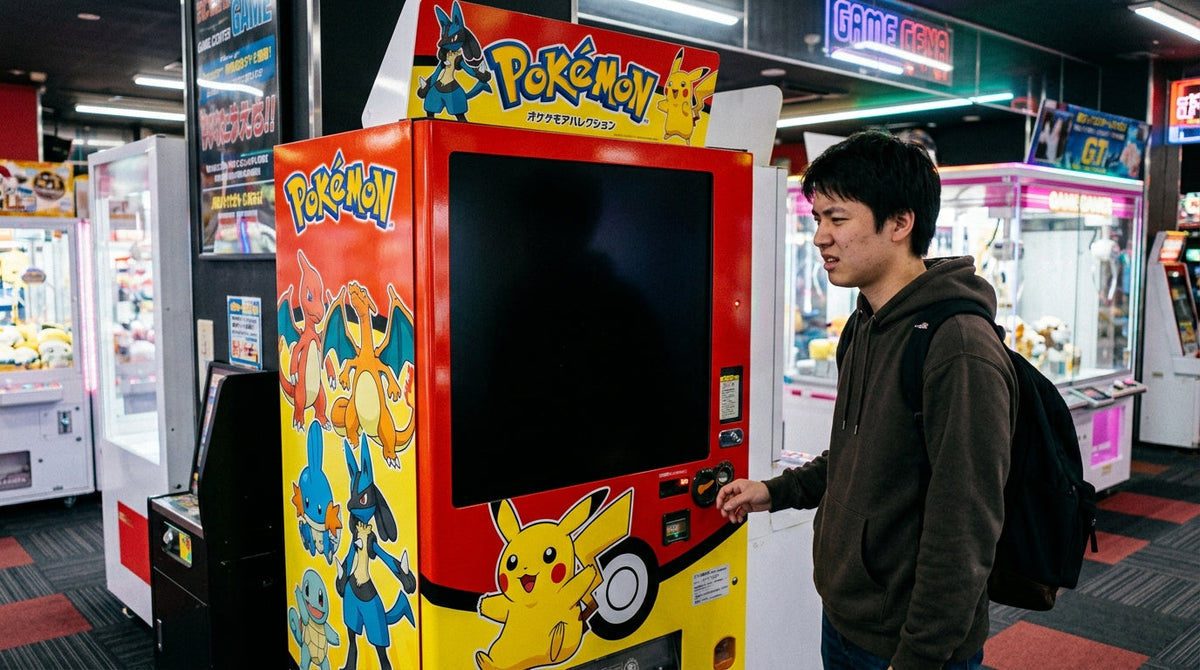

A pokemon vending machine black screen almost always traces back to one of five causes: a power interruption, a loose display cable, a firmware freeze, thermal shutdown, or a misconfigured sleep timer. Most of these resolve in under five minutes with a controlled power cycle, and the sequence below walks through diagnosis in the order a field technician would actually check it, from the fastest fix to the ones that require a service call.
Trading card vending kiosks run on the same embedded computing hardware as any modern self-service retail machine: a mainboard, a power supply, a touchscreen panel connected by a display cable, and firmware that manages inventory, payment, and the product-browsing interface. When any one link in that chain drops, the screen goes dark even though the cabinet, coin mechanism, or card reader may still be fully powered.
On this page
The screen goes black because power, data, or software stops reaching the display panel, and each of those failure points produces a slightly different pattern of symptoms. Working through the six causes below in order rules out the easy fixes before you touch a screwdriver.

The display is the first component to lose power when voltage drops, because it draws less current than the compressor, motors, or dispensing mechanism and is often on a separate regulated line. A tripped breaker, a loose plug, a failed power adapter, or a dead outlet on a shared circuit will black out the screen while leaving the rest of the cabinet silent as well. If the whole machine is dark, not just the screen, start here.
Inside the cabinet, the touchscreen connects to the mainboard through an HDMI or LVDS ribbon cable. Vibration from restocking, shipping, or repeated door slams works these connectors loose over months of operation. This is the most common cause when the screen is black but you can still hear the machine boot, the fan spin, or the coin mechanism cycle, because the logic board is powered and running, it just is not reaching the panel.
The embedded operating system that renders the product catalog, runs the payment terminal, and syncs inventory can lock up the same way a phone or POS terminal does. A frozen application often causes the display errors and unresponsive screens that stem from a communication fault between the control board and the display module, rather than a hardware defect, which is why a forced reboot fixes the majority of these cases without any parts replacement.
Enclosed electronics cabinets trap heat, and direct sunlight, poor ventilation, or a failed internal cooling fan can push the display above its safe operating temperature. Panels commonly go black under thermal stress as a built-in protection response, then recover once the unit cools. Machines placed near windows, HVAC vents blowing warm air, or kitchen equipment are the most exposed to this failure mode.
Many touchscreen kiosks include a power-saving timer that dims or blanks the display after a set period of inactivity to extend panel life. If that timer is set too aggressively, or the motion sensor meant to wake the screen is misaligned, the machine looks dead to a customer even though it is fully operational underneath. A single tap on the panel usually confirms this in seconds.
When every other cause has been ruled out, the remaining possibility is a failed backlight, a cracked panel, or a dead mainboard. These are the least common causes but the only ones that require a technician and, in most cases, a replacement part rather than a reset.
Before opening the cabinet, run a full power cycle. This clears the majority of black screen faults caused by firmware freezes and does not require any tools or technical background.
For the exact button sequence and card reader reset combination specific to VMFS trading card units, see the dedicated walkthrough on how to reset a Pokemon vending machine.
Match what you observe against the table below to jump straight to the likely cause instead of working through every possibility.
| Symptom | Likely Cause | Fix |
|---|---|---|
| Fully dark, no LED anywhere on the cabinet | No power reaching the unit | Check the outlet, breaker, and power adapter |
| Black screen, but coin or card mechanism still cycles | Loose or disconnected display cable | Open the cabinet and reseat the cable |
| Screen flickers, then goes fully black | Failing backlight or intermittent connection | Tighten cable, inspect backlight strip |
| Black screen, but card reader still beeps on tap | Firmware freeze; backend still running | Force a full power cycle |
| Goes black at roughly the same time daily | Sleep or standby timer set too short | Tap screen; adjust power-save settings |
| Goes black on hot afternoons or in direct sun | Thermal shutdown | Improve ventilation, relocate away from heat source |
If the power cycle does not resolve the issue, work through these checks in sequence. Each one isolates a different point in the power-to-panel chain.
With the unit unplugged, open the service panel and locate the cable running from the mainboard to the back of the touchscreen. Reseat both ends firmly and check for pinched or frayed sections, particularly near hinge points on models with a swing-open display housing. A cable that looks intact but has a hairline break inside the jacket will often test fine visually while still failing under vibration.
Confirm the wall outlet is live using a different device, then check the adapter itself for a status LED. If the adapter shows no light under load, it has failed and needs replacement rather than repair. Machines on a shared circuit with other high-draw equipment, such as a refrigeration unit or espresso machine, are more prone to voltage sag that can intermittently blank the screen without tripping a breaker.
Most trading card units include a manufacturer service menu accessible through a hidden button combination or a management app that allows a firmware-level reset separate from a simple power cycle. This clears cached inventory or payment session data that a basic reboot leaves untouched, and it is the step most likely to fix a screen that goes black specifically after a completed transaction.
Call for professional service if the screen stays black after a confirmed power cycle, a reseated cable, and a verified adapter, since that combination points to a failed backlight, a cracked panel, or a dead mainboard. Attempting a panel or board swap without manufacturer parts and instructions risks voiding the warranty and causing secondary damage to the payment terminal wiring.

Loose cables and dust buildup around cooling fans are the two most preventable causes of screen failure, and both are caught during a standard service visit. Following a documented Pokemon vending machine maintenance schedule keeps cable connections tight and cooling paths clear before they cause a service interruption, and it typically gets bundled into the same visit as restocking, so it is worth aligning your restock schedule with a quick internal inspection.
Direct sun exposure and heat-vent proximity are avoidable causes of thermal shutdown, and correcting placement eliminates a recurring failure without touching the hardware at all. Placement decisions matter enough to a machine's uptime that they are covered in depth separately below.
Machines running on connected platforms can flag a display fault, a power interruption, or an unusual temperature reading before a customer ever encounters a black screen in person, cutting the average time between failure and service response from days to hours for operators managing multiple locations.
Most black screen faults are solvable on-site without a technician, but knowing which category a fault falls into up front saves an unnecessary service call or a delayed fix.
DIY Power Cycle and Cable Check
Pros: Free, takes under ten minutes, resolves the majority of firmware freezes and loose-connection faults, no downtime waiting on a technician.
Cons: Will not fix a genuine hardware failure, requires opening the cabinet, risks operator error on units still under warranty if the seal is broken improperly.
Professional Repair
Pros: Correctly diagnoses backlight, panel, or mainboard failure, keeps warranty intact, replaces parts with manufacturer-approved components.
Cons: Costs more, means longer downtime for the machine, unnecessary if the fault is a simple power cycle or cable reseat.
Trading card kiosks carry more display-dependent hardware than a standard snack or drink machine, because the screen is not just a menu, it is the product browsing and selection interface itself. Understanding how Pokemon vending machines work makes clear why a display fault takes the entire unit offline for sales, unlike a snack machine where a broken screen might still allow button-based selection. A closer look at the individual Pokemon vending machine components shows the touchscreen sits in the same circuit path as the AI product recognition camera on many models, so a mainboard fault can affect both systems simultaneously. For a broader picture of what separates these machines from standard vending hardware, the overview of what Pokemon vending machines are covers the category in full.
Recurring black screen issues are frequently a symptom of underspecified hardware rather than bad luck, particularly cheaper units with undersized cooling or non-industrial panels not rated for continuous public-facing operation. Before buying, compare specifications against the current Pokemon vending machine prices and cost guide so a lower sticker price is not hiding a lower-grade display assembly, and review the full how to buy a Pokemon vending machine checklist for the questions worth asking a supplier directly about panel warranty terms and mean time between failures.
Downtime from a black screen has a direct revenue impact, and operators running multiple machines across leased retail space feel that impact fastest, since a location partner's revenue share depends on the machine actually transacting. Understanding whether the Pokemon vending machine business is profitable starts with keeping uptime high, and that in turn starts with the business being structured to handle equipment disputes and location agreements cleanly rather than informally.
Operators who start and operate a Pokemon vending machine as a formal business, rather than a side hustle, are better positioned when a location owner asks who is liable for lost sales during a repair window. Forming a proper entity before that conversation happens, not after, is the difference between a five-minute clause in a location agreement and a dispute.
Structure your vending business before a downtime dispute forces the issue
Form an LLC for Your Vending BusinessTrademark exposure is a related and frequently overlooked risk. Before customizing cabinet branding or marketing materials, confirm whether you can use the Pokemon logo on a TCG vending machine and separately review whether it is legal to sell Pokemon product through a vending machine in your state, since licensing rules sit outside the equipment questions entirely.
A meaningful share of thermal and power-related black screen faults trace back to where the machine sits, not what is inside it. Reviewing the best places for Pokemon vending machine placement before installation avoids direct sun exposure, HVAC vent proximity, and shared-circuit outlets that cause repeat failures down the line. If you manage retail space rather than machines and want to evaluate hosting one, the how to use a Pokemon vending machine guide is a useful reference for what the customer experience actually looks like day to day.
Have retail space and want a vetted operator matched to your location?
List Your Location With VPlacedMost black screen faults trace back to power, a cable, or firmware rather than a dead panel, which is why the power cycle sequence above resolves the majority of cases without a service call. For machines sourced through VMFS USA, a commercial vending machine company in the USA, industrial-grade panels and remote diagnostics are built in specifically to reduce how often operators see this issue in the field.
Stop Losing Sales to a Black Screen
Industrial-grade panels, remote diagnostics, and built-in thermal protection on every VMFS trading card unit.
Pokemon Card Vending MachineLooking for a combo food and card unit?
TCG Food Vending MachineNeed higher capacity for a busy location?
Large Pokemon Vending MachineA sudden black screen is most often a firmware freeze or a loose display cable rather than a hardware failure. Both are ruled out with a full power cycle in under five minutes before assuming a part needs replacing.
Unplug the unit at the wall outlet, wait a full 60 seconds for the internal capacitors to discharge, then plug it back in and allow two to three minutes for the operating system and payment terminal to fully load before tapping the screen.
Yes. If the card reader still beeps on tap or the coin mechanism still cycles while the screen stays dark, the mainboard is powered and running, and the fault is isolated to the display cable or the panel itself rather than the whole system.
A confirmed hardware defect, such as a failed backlight or mainboard, is typically covered under the manufacturer warranty period. Damage from unauthorized cabinet repairs, water exposure, or physical impact is usually excluded, so check the specific terms before opening the panel yourself.
Cost depends on whether the fault is a cable, a backlight, or a full panel replacement, with a full panel swap costing the most since it requires a technician visit and manufacturer-sourced parts. Confirming the exact cause first, using the diagnostic checklist above, avoids paying for a panel replacement when a cable reseat would have fixed it.
Yes. Enclosed electronics cabinets trap heat, and a panel that exceeds its safe operating temperature will often blank out as a built-in protection response, then recover once it cools. Machines placed in direct sun or near heat vents are the most exposed to this.
A screen that blanks on a predictable schedule is usually a sleep or standby power-save timer, not a fault. A single tap on the panel should wake it instantly; if it does, the fix is adjusting the standby timer setting rather than any repair.
If the screen is black but you can still hear the machine boot, the fan spin, or the payment terminal cycle, the mainboard is running and the display simply is not receiving signal, which points directly to a loose or damaged cable rather than a power or firmware issue.
No. Nightly power cycling is unnecessary for machines that are properly ventilated and on a stable circuit, and it adds wear to the power supply over time. A scheduled maintenance check for loose cables and dust buildup is more effective at preventing failures than daily power cycling.
Call for professional service once a confirmed power cycle, a reseated cable, and a verified power adapter have all failed to bring the screen back. At that point the fault is almost certainly a failed backlight, panel, or mainboard, and attempting a swap without manufacturer parts risks voiding the warranty.
Compartir:
How to Get a Stuck Drink Out of a Vending Machine (Safe, Proven Methods)
Pokemon Vending Machine Drop Times: When Machines Actually Restock