




Design the perfect vending solution for your location and customers.

Join the VMFS newsletter and step into a thriving network dedicated to collective success.
One signup. Endless possibilities.
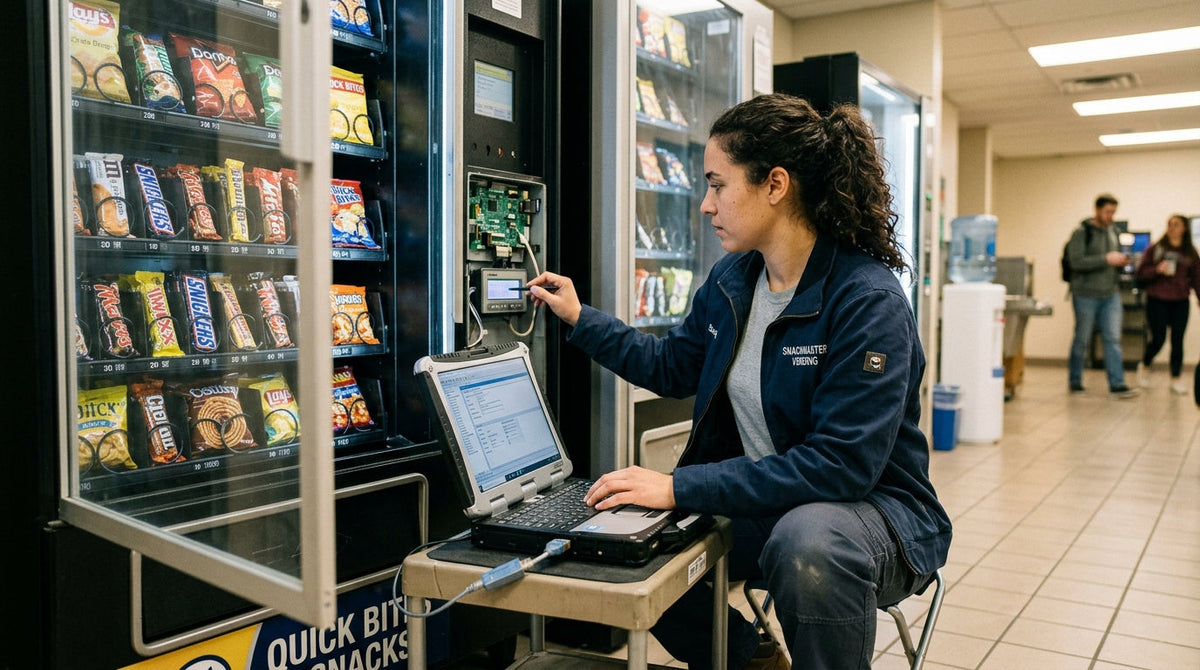
Programming a snack vending machine means configuring the control board's settings for product slot assignments, per-selection pricing, payment system parameters, and, on combo units, temperature control, all through a service menu accessed via a key switch, access code, or management app depending on the machine's generation. This process differs meaningfully between a current-generation touchscreen machine, where nearly everything happens through guided software menus, and an older mechanical or DIP-switch unit, where the same configuration happens through physical hardware settings and printed reference charts. Operators who skip a structured approach to programming often end up troubleshooting the same avoidable errors repeatedly across every new machine they deploy, which is exactly the pattern this guide is built to prevent. This guide walks through every stage of programming a snack vending machine, from initial slot setup through ongoing telemetry configuration, covering both modern and legacy equipment in detail.
Table of Contents
Programming refers to configuring the machine's control board and associated hardware to correctly link a customer's button press or touchscreen tap to the right product, the right price, and the right dispensing motor, rather than any kind of custom software development. Every vending machine ships with this logic in place at a basic level, but an operator has to program the specific details, which product sits in which slot, what each item costs, how payment hardware communicates with the control board, before the machine functions correctly for a given location and product mix. This distinction matters because "programming" in the vending context is closer to configuration than coding, and understanding that framing removes most of the intimidation first-time operators feel approaching an unfamiliar control board.
Early electromechanical vending machines used relay-based logic with no programmable memory at all, meaning pricing and slot assignment were fixed by physical wiring configured at the factory or by a technician during installation, with virtually no operator-level adjustment possible after the fact. The introduction of microprocessor-based control boards in the following decades changed this fundamentally, storing configuration data in electronically erasable memory that an operator could modify directly through switches or, later, simple numeric keypads. The most recent generation, built around full embedded computing with touchscreen displays and network connectivity, treats programming as software configuration entirely, storing settings in a database that syncs with cloud infrastructure rather than living solely on the physical machine. This progression explains why the programming method for any given machine correlates so closely with its manufacturing era, and why a technician servicing a mixed fleet of old and new equipment needs fluency across genuinely different technical paradigms rather than one universal skill set.
Most machines require a physical service key or a numeric access code to enter programming mode, and confirming which one your specific model uses before arriving on-site avoids a wasted trip. Having your complete planned product list and pricing plan written out in advance speeds up the actual configuration process considerably, since referencing a prepared sheet is far faster than deciding pricing decisions in real time while standing in front of an open cabinet. Older mechanical machines may also require a small screwdriver for coin mechanism or DIP switch access, and a printed reference chart, either from the original manual or a manufacturer's support page, becomes essential on any machine using switch-based rather than menu-based configuration.
Every generation of vending machine control board handles the transition into programming mode differently, and knowing which category your machine falls into determines which section of this guide actually applies.
Current-generation machines typically require holding a hidden button combination or entering a management PIN directly on the touchscreen, which opens a guided administrative menu clearly separated from the customer-facing purchase interface. This menu structure is designed for non-technical operators, walking through configuration options in a logical sequence rather than requiring memorized command codes.
Machines from the transitional generation between purely mechanical and fully touchscreen-based control often use a physical keypad paired with a small LCD or LED display, requiring a specific key sequence, commonly documented in the manual as something like pressing a numbered combination, to enter service mode. Navigation through these menus happens via arrow or numbered buttons rather than direct screen taps.
The oldest machines still in active service handle programming through physical hardware rather than any menu at all, using banks of small DIP switches or rotary dials mounted on the control board itself, each switch position corresponding to a specific setting documented in a reference chart. This method requires no digital literacy whatsoever but does require correctly matching switch positions to their intended values, which is impossible without the original or a reconstructed reference document.
Once you're inside programming mode, the actual configuration process follows a consistent logical sequence regardless of machine generation, even though the specific interface for each step varies considerably.
A planogram is the deliberate layout plan mapping specific products to specific slots based on expected sell-through rate, placing top-selling items in the most mechanically reliable or most visible positions rather than assigning products randomly as they arrive for restocking. Programming this layout correctly into the machine's system means the control board's internal slot-to-product mapping matches the physical planogram exactly, since any mismatch between what's physically loaded and what the system thinks is loaded causes incorrect dispensing regardless of how well the mechanical side is functioning. Revisiting and reprogramming the planogram periodically, based on actual sales data rather than initial assumptions, is standard practice among experienced operators rather than a one-time setup task performed only at installation. A well-designed planogram also accounts for mechanical reliability differences between slot positions, since certain coil positions on some machine models experience more wear over time and are better reserved for lower-volume items rather than the fastest-selling product in the machine.
Machines equipped with connectivity hardware communicate with an operator's dashboard using standardized vending industry protocols, most commonly DEX, short for Data Exchange, which handles sales and inventory data reporting, and MDB, short for Multi-Drop Bus, which governs how peripheral devices like payment terminals communicate with the main control board. Configuring telemetry typically involves confirming the machine's cellular or Wi-Fi connection is active, linking the specific unit to an operator account in the monitoring software, and verifying that sales data actually populates the dashboard correctly during a test transaction. This setup step is what transforms a mechanically functional machine into one that reports real-time inventory and health data, the foundation of modern remote fleet management across multiple locations. Operators managing several machines benefit from standardizing telemetry setup across every unit during initial programming, since inconsistent configuration between machines in the same fleet creates unnecessary complexity when troubleshooting a specific unit's data reporting later on.
| Machine Type | Programming Method | Typical Time to Configure |
|---|---|---|
| Modern touchscreen | Guided software menu | 15–30 minutes for full setup |
| Keypad/LCD menu-driven | Button sequence navigation | 30–45 minutes for full setup |
| DIP switch/mechanical | Physical switches with reference chart | 45–60+ minutes, more with unfamiliar charts |
| Telemetry-connected | Menu setup plus remote dashboard linking | Additional 10–15 minutes for connectivity setup |
Mismatched motor-to-slot assignment is the single most common programming error, causing the machine to dispense a different item than the one selected, and it's typically caused by loading product into a physical slot without updating the corresponding system assignment first. Incorrect decimal placement in pricing is a close second, since a price entered as $0.75 instead of $7.50, or vice versa, isn't always obvious until a customer transaction actually surfaces the error. Skipping the post-configuration test transaction is a third frequent mistake, since it's the only step that actually confirms the programming worked correctly rather than just appearing correct within the menu itself.
Confirm physical loading matches system assignment before finalizing setup.
Pricing errors from misplaced decimals are common and easy to miss.
A live test transaction is the only real confirmation settings work correctly.
If a test transaction shows the wrong price, recheck decimal placement first, since this remains the most common cause even on machines with otherwise correct configuration. If the wrong item dispenses, verify the motor number assigned to that slot matches its actual physical position, since a swapped assignment between two adjacent slots is a common and easy-to-miss error. If settings don't appear to save at all after exiting programming mode, confirm you completed the save or confirm step specifically, since simply navigating out of the menu without an explicit save command on some machines silently discards the changes just made. A machine that seems to accept new settings but reverts to old pricing after a power cycle often indicates a battery-backup or memory issue on older control boards, which is a hardware problem beyond standard reprogramming and typically requires technician attention.
Recording every setting change in a written or digital log, separate from whatever the machine itself stores internally, protects against losing an entire configuration to a control board failure or accidental factory reset. Modern telemetry-connected machines often back up configuration data automatically to the cloud dashboard, but older mechanical and keypad-driven units have no such safety net, making a manually maintained reference sheet the only real protection against having to reprogram an entire machine from scratch after a hardware fault. This documentation habit pays off most clearly across a multi-machine operation, where consistent programming standards across every unit make troubleshooting and staff training considerably faster than treating each machine's configuration as a one-off memory exercise.
Standard slot, pricing, and payment configuration on a documented machine. DIP switch adjustments with a correct reference chart available. Telemetry linking following the manufacturer's standard setup guide.
Missing documentation for an unfamiliar older machine's switch configuration. Settings that repeatedly fail to save correctly after multiple attempts. Any issue suggesting control board hardware failure rather than a configuration mistake.
Newer touchscreen machines offer faster, more error-resistant programming through guided menus that flag obvious mistakes, like a price entered with too many digits, before they're even saved. Older mechanical machines, while slower and more dependent on accurate documentation, offer a benefit modern machines sometimes lack: complete functionality with zero dependency on software updates or connectivity, meaning a well-documented older machine can be programmed correctly by anyone with the reference chart regardless of any digital literacy or internet access at all. Operators managing a mixed fleet spanning both generations often find that standardizing on newer equipment over time reduces overall training burden, since staff only need to master one programming paradigm rather than switching mental models between a touchscreen unit and a DIP-switch panel on consecutive service stops.
Correct programming directly protects revenue in ways that go beyond simply avoiding embarrassing pricing errors. A planogram programmed to match actual demand, with popular items given priority slot placement and pricing calibrated to the location's specific audience, converts more browsing into purchases than a generic, unoptimized configuration. Understanding how customers actually use a vending machine during a purchase reinforces why programming choices, like slot visibility and price display clarity, have a direct and measurable effect on conversion rather than being a purely administrative afterthought. Misprogrammed pricing carries a subtler cost too: a price set too low silently erodes margin on every single sale from that slot until someone notices and corrects it, while a price set too high suppresses sales volume without ever generating a visible error or complaint, making periodic pricing audits as valuable as the initial setup itself.
Programming is one operational skill within a much larger equipment management picture that includes capacity planning and site-specific configuration decisions. Understanding machine capacity and machine dimensions together helps operators anticipate how many slots they'll actually need to program before a machine even arrives on-site, while a detailed pricing guide offers a useful cross-reference for setting competitive per-selection pricing during initial configuration. For operators managing multiple machines across different sites, VPlaced's location owner matching process helps source new locations that will eventually need this same programming process repeated at scale.
Business structure also plays a role once programming responsibility scales across a growing machine fleet; many operators form an LLC for their vending machine business as equipment count grows, with a registered agent for a vending machine business ensuring compliance correspondence reaches the business reliably as the operation expands beyond a single machine and a single operator handling every configuration task personally.
Modern machines with guided programming menus — no reference charts required.
From straightforward standard units to full-feature smart configurations.
Access the machine's service mode, set up product slots and motor assignments, assign prices per selection, configure payment settings, set temperature parameters if refrigerated, and save before testing a live transaction.
It means configuring the control board's settings, like slot-to-product assignments and pricing, rather than any custom software development, making it closer to configuration than coding.
Modern machines typically use a hidden button combination or management PIN, while older machines require a physical service key or, on the oldest models, direct access to DIP switches or dials.
A planogram is the deliberate layout plan mapping specific products to specific slots based on expected sell-through rate, which must match the control board's internal slot assignments exactly.
DEX (Data Exchange) is the standard protocol for reporting sales and inventory data, while MDB (Multi-Drop Bus) governs how peripheral devices like payment terminals communicate with the control board.
Mismatched motor-to-slot assignment is the most common error, causing the machine to dispense a different item than the one selected, followed closely by incorrect decimal placement in pricing.
Yes, always run a live test transaction on at least a sample of slots after programming, since it's the only step that confirms settings actually work rather than just appearing correct in the menu.
Call a technician if documentation is missing for an unfamiliar older machine, if settings repeatedly fail to save, or if symptoms suggest control board hardware failure rather than a configuration mistake.
Yes, maintaining a written or digital log of every setting change protects against losing an entire configuration to a control board failure, especially on older machines without automatic cloud backup.
Yes, a planogram matched to actual demand with correctly calibrated pricing converts more browsing into purchases, while pricing errors silently erode margin or suppress sales without generating a visible complaint.
Share:
How to Use a Drink Vending Machine: The Complete Guide
How to Get a Stuck Drink Out of a Vending Machine (Safe, Proven Methods)